Turn off the oil service light
Service, Engine oil
Changed the oil yourself? Reset the Condition Based Service reminder from the driver’s seat.
Diagnostics, live data, coding and service resets for your BMW, on iPhone and Android. Scan every module, clear faults and watch the car’s health over time with a simple OBD-II adapter.


Built for E-series chassis
5
diagnostic protocols
DS2, KWP2000, UDS, ISO-TP and DoIP

4
ways to connect
Bluetooth, Wi-Fi, USB and ICOM / ENET

$29
one-time price
No subscription, no ads, three cars included

0
ads or trackers
Your car’s data stays on your phone


Turn what your car’s modules are saying into clear, actionable answers.
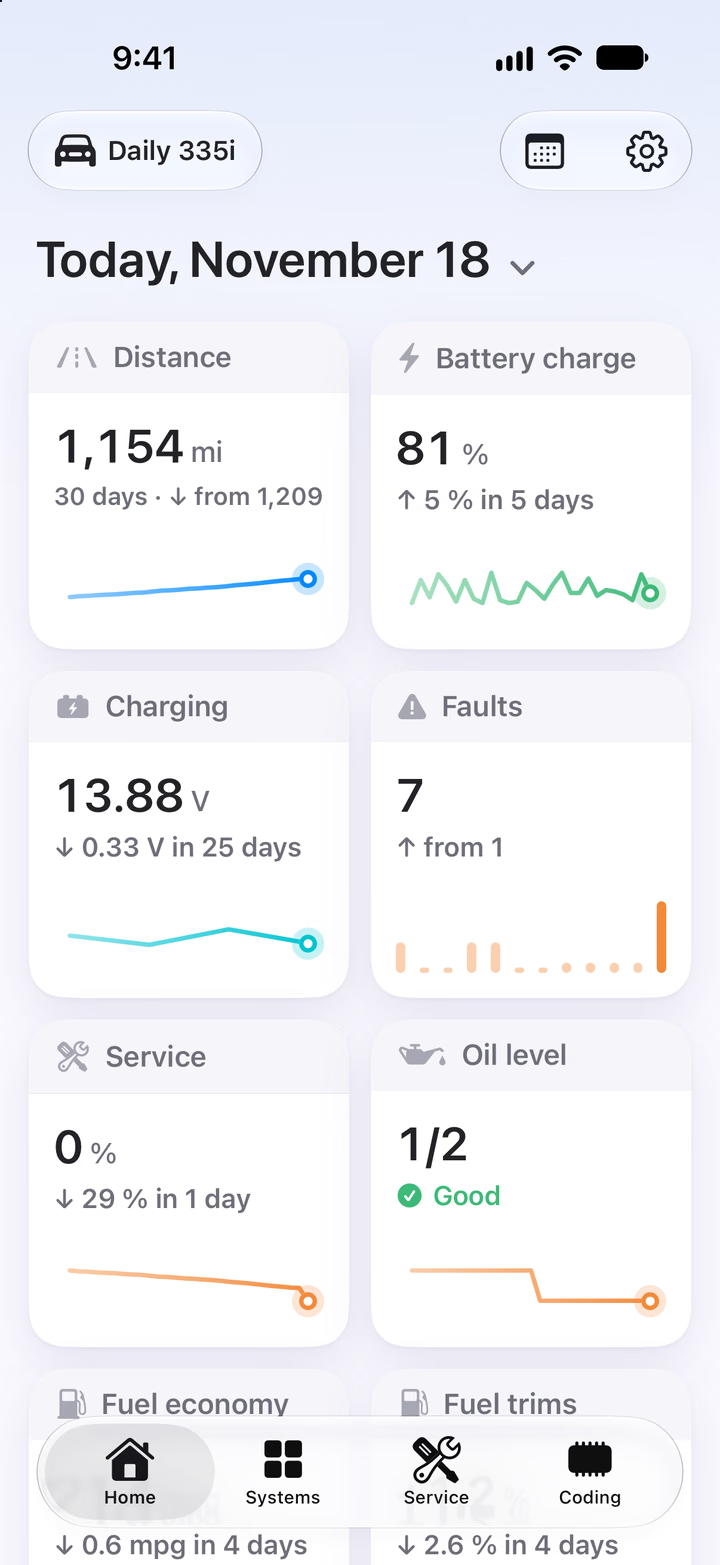
Today at a glance: battery charge, oil level, fuel economy and faults, each with its trend. Pick the cards you want and drag them into order.
A page for every system your car has, and none it doesn’t: health check, engine, battery, gearbox, live data and the controls.

See what’s due and when. Reset oil, brakes and inspections after the work is done, register a battery and bleed the brakes.
One scan reads every module, sorts what it found by how much it matters, and clears the codes when the work is done.
Every module’s coding in plain English, popular options on a switch, and a backup of the whole car before you change a thing.

The jobs that used to need a Windows laptop, a stack of legacy software and a lot of patience.
Live data
Pick any reading the engine computer offers, lay it out as gauges and graphs, and record a drive to play back later.

Engine
Every reading on its normal range, misfires counted per cylinder, and fuel economy and fuel trims tracked from one drive to the next.

Battery
Guided resting, crank and charging tests graph the voltage and explain the result. Energy diagnosis finds the modules that won’t let the car sleep.
Inspection
A pre-purchase inspection cross-checks the mileage between modules, weighs up the stored faults and gives you a verdict to share as a PDF.
Controls
Lock and unlock, lights, windows, mirrors, seats and climate. The page shows the controls your car really has and reads each one back.

BimmerStack also does all of this:
Tell the car a fresh battery was fitted.
Condition Based Service intervals, reset in seconds.
Reset fuel trims, VANOS, throttle, knock and ZF 6HP adaptations.
Run the pumps through a guided bleed after the work.
Find the drain and what keeps waking the car.
Gateway, audio and the MOST ring, node by node.
Live gearbox data and the wear on each clutch pack.
Check the electric steering lock and reset its counter.
Read and clear restraint system faults.
Mileage and VIN check, needle sweep and display test.
Save the whole car’s coding, compare it and restore it.
Run any read-only job a module offers.
Every check, fault and reading, day by day.
Charge, oil level, fuel economy and fuel trims over time.
Choose the cards and trend tiles on your Home page.
Save your cars. Each one is recognised by its VIN.
BMW owners often juggle a coding app, a diagnostics app and a Windows laptop running INPA and NCS Expert. BimmerStack does those jobs in one app for $29, once.
Read and clear fault codes in every control module, check each module’s identification and watch any live reading.
Instead of
Change any module’s coding in plain English, back up the whole car first and restore it if you change your mind.
Instead of
Reset Condition Based Service reminders, register and test the battery, bleed the brakes and reset adaptations.
Instead of
Cross-check the mileage between modules, read every fault and get a verdict to share before you hand over the money.
Instead of
Your car’s data stays on your phone and only travels between it and your adapter. Nothing is sent to us unless you choose to share a report.


The fixes that used to mean a trip to the dealer or an evening fighting with old laptop software.
Service, Engine oil
Changed the oil yourself? Reset the Condition Based Service reminder from the driver’s seat.
Service, Battery registration
Fitting a new AGM? Register it so the charging strategy matches the battery you just installed.
Systems, Health
One scan reads every module and tells you what it found, starting with what matters most.
Systems, Pre-purchase inspection
Cross-check the mileage between modules and get a verdict you can send to the seller.
Systems, Battery
Run the resting, crank and charging tests to see whether the battery or the alternator is the weak link.
Systems, Battery
Run an energy diagnosis to find the module that keeps the car awake overnight.
Systems, Engine
See misfires counted per cylinder and, on a diesel, how much fuel each injector is correcting.
Service, Brakes
A guided bleed runs the DSC pump corner by corner while you watch the fluid.
Systems, iDrive health check
Check the gateway, the audio and the MOST ring to see which unit stopped answering.
Coding, Snapshots
Save the coding of every module, compare it with the car later and write it back if you need to.
Coding, Used module
Give a module from another car this car’s VIN and coding.
Service, Adaptations
Reset fuel trims, VANOS, throttle valve and ZF 6HP transmission adaptations.
Systems, Controls
Lock up, switch on the lights or run a window from your phone while you’re connected.
Home, Garage
Save each car to your garage. BimmerStack recognises it by its VIN and keeps its own history and Home layout.
Everything you need to know before you plug in.
On iPhone, a Bluetooth LE adapter (such as the vLinker BM+, Vgate iCar Pro BLE, OBDLink CX or Veepeak BLE), a Wi-Fi ELM327, or an ICOM / ENET adapter on your network. Android also supports paired classic-Bluetooth ELM327s and USB K+DCAN cables (FTDI, CP210x, CH340) through a USB-C OTG adapter.
BimmerStack is built for E-series BMWs, including the 1 Series (E82, E87), 3 Series (E46, E90, E91, E92, E93), 5 Series (E39, E60, E61), 6 Series (E63), 7 Series (E38), X5 (E53, E70), X6 (E71) and Z4 (E85). It speaks DS2, KWP2000 and UDS, so both K-Line and D-CAN cars are covered. The app shows only the systems and controls your car has. F and G-series support is still being tested.
Yes. BimmerCode is a coding app and BimmerLink is a diagnostics app, sold separately. BimmerStack puts diagnostics, live data, service resets, battery registration, coding and pre-purchase inspections in one app, for a one-time $29.
For everyday jobs on E-series cars, yes, and without a Windows laptop. BimmerStack reads and clears faults in every module like INPA, and reads and changes each module’s coding like NCS Expert, with the options named in plain English and a backup taken first.
Yes. The Service tab registers a new battery and resets Condition Based Service reminders for engine oil, front and rear brake pads, brake fluid, spark plugs, the cabin microfilter, the vehicle check and the inspections. The Battery page under Systems reads IBS battery status and runs resting, crank and charging tests.
Yes. The Engine page shows coolant, oil and intake air temperature, fuel trims and more, each against its normal range, and counts misfires per cylinder. The Live data page offers every reading the engine computer has: lay them out as gauges and graphs, and record a drive to play back later.
Yes. The pre-purchase inspection reads every module’s faults, cross-checks the mileage stored in different modules, checks the gearbox, steering lock and battery, and gives a verdict with a report you can share as a PDF. It only reads: nothing on the car is changed.
Anything that writes to a module asks for confirmation first, and the app checks that your adapter is fit for the write before it starts. Coding backs the module up before changing it, and Snapshots saves the whole car’s coding so you can restore it. Keep the battery charged, don’t interrupt power, and only change what you understand.
No. The app in the App Store and on Google Play doesn’t write firmware. It reads and changes coding, runs service functions and diagnoses.
BimmerStack is free to download. A one-time $29 unlocks it for three cars, paid through the App Store or Google Play, and further cars are $5 each. There’s no subscription and no ads.
No. BimmerStack is an independent project and is not affiliated with, endorsed by or sponsored by BMW AG. BMW is a trademark of BMW AG, used here only to describe compatibility.

Plug in, connect and scan. BimmerStack reads your car as it is today and remembers it for tomorrow.

